
How to know if an AirTag is tracking you
Apple’s AirTag is designed to help people keep track of personal belongings like keys, bags and luggage. But because AirTags and other Bluetooth trackers are small and discreet, concerns about unwanted tracking are understandable. Apple has spent years building safeguards into the AirTag and the Find My network to reduce the risk of misuse and to alert people if a tracker they don’t own appears to be moving with them.If you’re worried about whether an AirTag or similar tracker might be following you, here’s how Apple’s unwanted tracking alerts work, what notifications to look for and what you can do on both iPhone and Android.How AirTag tracking alerts workAirTags, compatible Find My network accessories and certain AirPods models use Apple’s Find My network, which relies on Bluetooth signals and nearby devices to update their location. To prevent misuse, Apple designed these products with features that are meant to alert someone if a tracker that isn’t linked to their Apple Account app


Apple’s AirTag is designed to help people keep track of personal belongings like keys, bags and luggage. But because AirTags and other Bluetooth trackers are small and discreet, concerns about unwanted tracking are understandable. Apple has spent years building safeguards into the AirTag and the Find My network to reduce the risk of misuse and to alert people if a tracker they don’t own appears to be moving with them.
If you’re worried about whether an AirTag or similar tracker might be following you, here’s how Apple’s unwanted tracking alerts work, what notifications to look for and what you can do on both iPhone and Android.
How AirTag tracking alerts work
AirTags, compatible Find My network accessories and certain AirPods models use Apple’s Find My network, which relies on Bluetooth signals and nearby devices to update their location. To prevent misuse, Apple designed these products with features that are meant to alert someone if a tracker that isn’t linked to their Apple Account appears to be traveling with them.
If an AirTag or another compatible tracker is separated from its owner and detected near you over time, your device may display a notification or the tracker itself may emit a sound. These alerts are intended to discourage someone from secretly tracking another person without their knowledge. Apple has also worked with Google on a cross-platform industry standard, so alerts can appear on both iOS and Android devices, not just iPhones.
How to make sure tracking alerts are enabled on your iPhone
If you use an iPhone or iPad, tracking notifications are on by default, but it’s worth confirming your settings.
To receive unwanted tracking alerts, make sure that:
Your device is running iOS 17.5 or later (or iPadOS 17.5 or later). Earlier versions back to iOS 14.5 support basic AirTag alerts, but newer versions add broader compatibility with other trackers.
Bluetooth is turned on.
Location Services are enabled.
Notifications for Tracking Alerts are allowed.
Airplane Mode is turned off.
You can check these by opening Settings, then navigating to Privacy & Security, Location Services and Notifications. Apple also recommends turning on Significant Locations in the System Services menu, which helps your device determine when an unknown tracker has traveled with you to places like your home.
Go to Settings, tap Privacy & Security, then select Location Services.
Toggle Location Services on.
Scroll down and tap System Services, then toggle Significant Locations on.
If these settings are disabled, your iPhone may not be able to alert you when an AirTag or similar device is nearby.
What tracking alerts look like
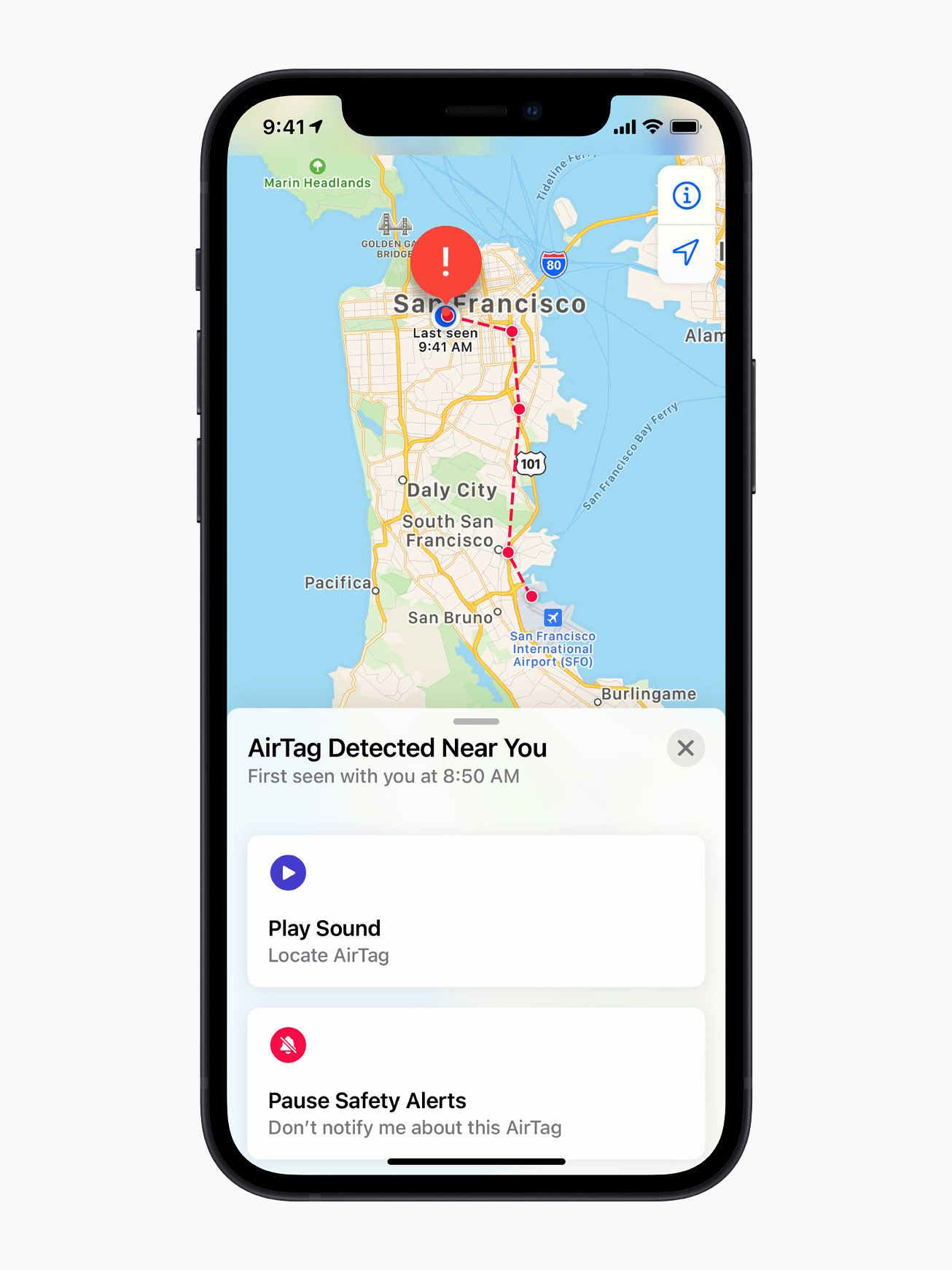
If your iPhone detects a tracker that doesn’t belong to you moving with you, you may see a notification such as:
AirTag Found Moving With You
AirPods Detected
“Product Name” Found Moving With You
Unknown Accessory Detected
Tapping the alert opens the Find My app, which shows a map of where the item was detected near you. The map uses dots to indicate locations where your device noticed the tracker nearby. This doesn’t mean the owner was actively watching your location at those times, only that the tracker was detected in close proximity.
In some cases, the alert may have an innocent explanation. For example, you might be borrowing someone else’s keys, bag or AirPods. If the item belongs to someone in your Family Sharing group, you can temporarily pause alerts for that item by tapping the notification and opting to turn off alerts for that item either for one day or indefinitely.
What to do if you hear an AirTag making a sound
If an AirTag or compatible tracker has been separated from its owner for a period of time and is moved, it may emit a sound on its own. This is another built-in safety feature meant to draw attention to the device.
If you hear an unfamiliar chirping or beeping sound, especially from a bag, jacket pocket or vehicle, it’s worth checking your belongings to see if there’s an AirTag or similar tracker inside.
How to find an unknown AirTag or tracker
If you receive an alert and believe the tracker is still with you, the Find My app offers tools to help locate it.
From the alert, you can choose to play a sound on the device to help pinpoint where it’s hidden.
Tap the alert.
Tap Continue and then tap Play Sound.
Listen for the sound or play it again to give yourself more time to find the item.
If the tracker is an AirTag and you have a compatible iPhone with ultra wideband connectivity, you may also see a Find Nearby option, which uses Precision Finding to guide you toward it with distance and direction indicators.
Tap the alert.
Tap Continue and then tap Find Nearby.
Follow the onscreen instructions. You may need to move around the space until your iPhone connects to the unknown AirTag.
Your iPhone will display the distance and direction of the unknown AirTag, so you can use that information to identify where the unknown AirTag is. When the AirTag is within Bluetooth range of your iPhone, you can tap the Play Sound button to listen for it. You can also tap the Turn Flashlight On button to provide more light if it’s needed.
If neither option is available, or if the tracker can’t be located electronically, manually check your belongings. Look through bags, pockets, jackets and vehicles. If you feel unsafe and can’t find the device, Apple recommends going to a safe public place and contacting local law enforcement.
How to get information about an AirTag
If you find an unknown AirTag, you can learn more about it without needing to unlock it or log in.
Hold the top of your iPhone, or any NFC-capable smartphone, near the white side of the AirTag. A notification should appear.
Tap the notification to open a webpage with details about the AirTag. This page includes the serial number and the last four digits of the phone number associated with the owner’s Apple Account.
If the AirTag was marked as lost, the page may also include a message from the owner explaining how to contact them. This can help determine whether the situation is accidental or intentional.
How to disable an AirTag that isn’t yours
If you confirm that an AirTag is tracking you and it doesn’t belong to you, you can disable it so it stops sharing its location.
From the Find My alert or information page, select Instructions to Disable and follow the steps provided. For an AirTag, this usually involves removing the battery, which immediately stops location updates. Disabling Bluetooth or turning off Location Services on your phone does not stop the AirTag from reporting its location. The device itself must be disabled.
If you believe the tracker was used for malicious purposes, keep the AirTag and document its details before contacting law enforcement. Apple states that it can provide information to authorities when legally required.
What Android users should know
Android devices running Android 6.0 or later can also receive alerts if a compatible Bluetooth tracker, including an AirTag, appears to be moving with you. These alerts are enabled automatically on supported versions of Android.
Android users can also manually scan for unknown trackers at any time. Additionally, Apple offers a free Tracker Detect app on the Google Play Store. The app allows Android users to scan for AirTags and Find My network accessories within Bluetooth range that are separated from their owner. If Tracker Detect finds a nearby AirTag that’s been with you for at least 10 minutes, you can play a sound to help locate it.
Wrap-up
While no system is perfect, Apple has built multiple layers of protection into AirTag and the Find My network to reduce the risk of unwanted tracking. With alerts, audible warnings and cross-platform detection on both iOS and Android, most people will be notified if a tracker they don’t own is moving with them. Knowing what these alerts look like and how to respond can help you stay informed, avoid unnecessary panic and take appropriate action if something feels off.This article originally appeared on Engadget at https://www.engadget.com/computing/accessories/how-to-know-if-an-airtag-is-tracking-you-130000764.html?src=rss
Share
What's Your Reaction?
 Like
0
Like
0
 Dislike
0
Dislike
0
 Love
0
Love
0
 Funny
0
Funny
0
 Angry
0
Angry
0
 Sad
0
Sad
0
 Wow
0
Wow
0