Base44 no-code review
A no-code solution for web apps, agents, and more.


Creating your own app no longer requires in-depth knowledge of an appropriate programming language. No-code tools like Base44 can be instructed to create web apps and superagents in minutes, using instructions written in much the same way you would explain the process of boiling an egg or running a bath.
Bought by Wix.com in 2025, just months after it was founded, Base44 is one of the most recognizable no-code tools. To ascertain how useful it can be, we’ve explored its features, its support for integration with third-party tools and services, and how easy it is to deploy. We’ve assessed its pricing and considered how Base44 compares with the competition, and we’ve also used it to create a web app.
To see more of the options that are out there, take a look at our list of the best no-code platforms.
Base44: Features
From the off, Base44 gives you a free option with 25 message credits and 100 integration credits. It is worth noting, however, that these have varying values depending on the type of project you’re describing. These credits increase through the plans, as do the features. Free users get database functionality, for example, along with authentication tools and analytics.
Scale up to a paid plan, and you can get unlimited app projects, in-app code edits, a choice of AI model, GitHub integration, domain connection, backend functions, and even premium support.
Base44 also has beta functions under ongoing development, which can also be accessed with the top tier plans.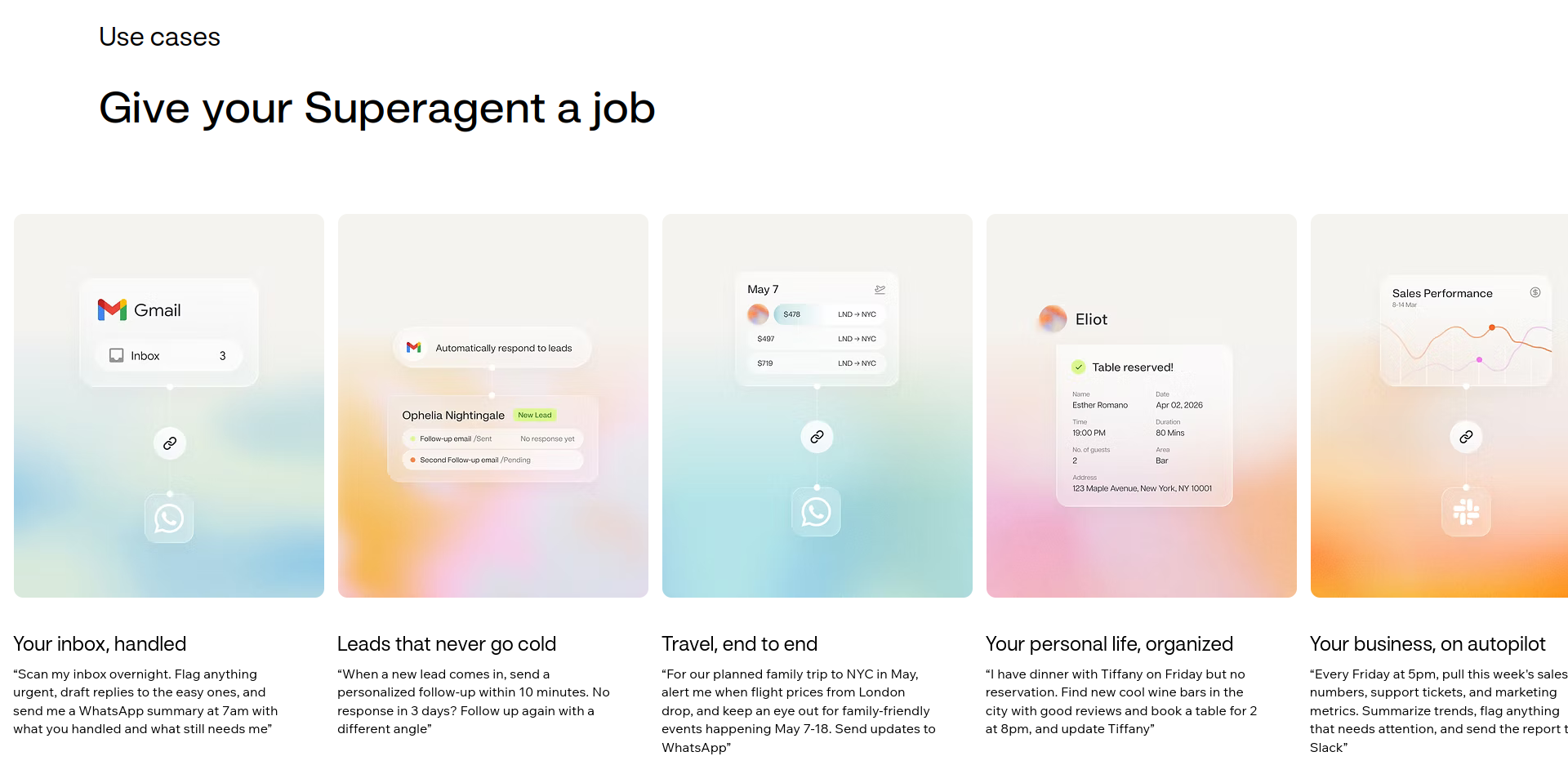
The key feature of Base44, beyond its no-code prompt, is its support for superagents. These are described as being able to “do the work of a personal assistant, support rep, marketing team, analyst” and all you need to do is tell it what to do. Along with various templates – such as specific options for finance-based tasks, e-commerce projects, and more – Base44 has a lot to offer in terms of integrations. Pretty much every productivity tool and data platform you can think of is available for connection to your web project or superagent.
As such, Base44’s potential as a no-code automation tool is a strong advantage.
Base44: Interface and ease of use
Base44 is designed to make it easy for you to develop a web app with instructions in plain English. You simply enter a prompt, and wait for the results. A clear user-interface – much like any other AI-based prompt box – is presented for use, although you do need to register first. Free and paid accounts are available, along with a free trial of the premium features.
You aren’t limited to text prompts, either. It’s an easy task to upload an image, to assist with your plans for a web app. Or you might initiate a connection to one of the many integrations supported by Base44.
In addition, Base44 has a mobile app, for both iPhone and Android, which is intended to assist in no-code development wherever you are. Projects can also be deployed or published via the mobile app.
Base44: Integration and extensibility
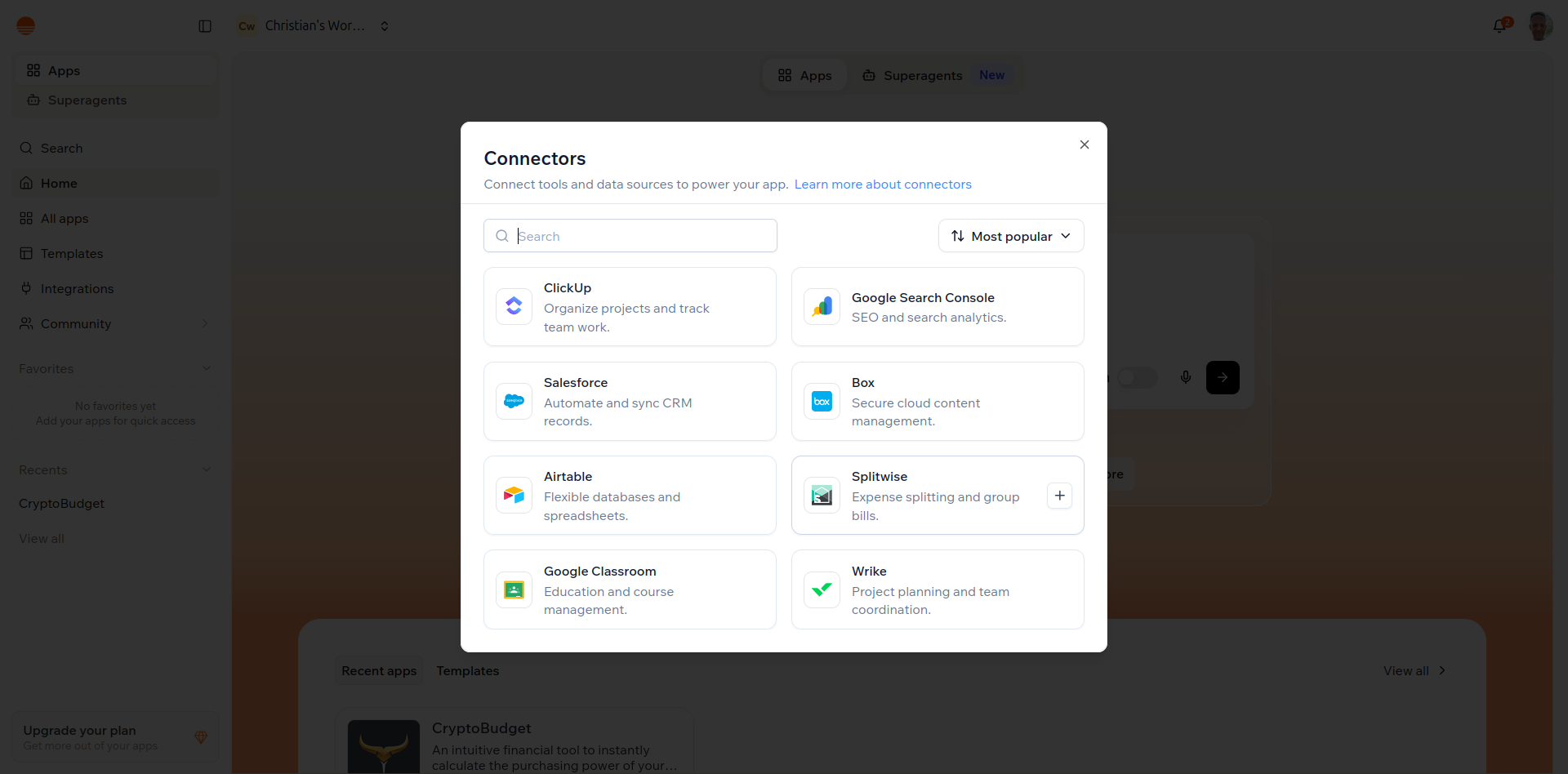
It’s worth taking a deeper look at the integrations and connections available with Base44. Most importantly, you do not need a third party database solution, as this is built into all plans. If you need it, however, Base44 supports Supabase with a dedicated connection.
Google Suite tools like Gmail, Google Docs, Google Sheets, and Google Calendar can be integrated with Base 44, as can Google Drive, Google Analytics, Search Console, and Meet. Slack and the Slack Bot can be connected, as can ClickUp and AirTable. Meanwhile, cloud storage like Dropbox, OneDrive, and Box are also options.
LinkedIn, Instagram Business, and Discord also have connection options with Base44. Many more are available, and each offers the potential for an integration with a web app or superagent automation.
Base44: Deployment and maintenance
Creating an app or superagent is only the first step. In order to use them, you need to publish.
Several options are available here. The simplest is to publish to a Base44 subdomain, but you can easily share it via email or to a social network, too. Note that there is no option to sync it to GitHub.
Note that once a project is published, the integration credits come into play. This means that a web app or superagent needs the integration credits to perform the tasks you have specified. If the credits run out, your no-code project will not work again until the period resets or you upgrade to get more credits.
As noted, your project can also be published via the mobile app. This also supports submission to the Apple App Store and Google Play for approval.
Creating a crypto price calculator with Base44
To help understand just how useful Base44 is as a no-code solution, I developed a prompt to create a web app. The aim of the tool is to calculate the price of popular cryptocurrencies when purchased in USD, GBP, or Euros. It relies on a free API (two are specified as options), which the app should be able to connect to and draw data from. The prompt also specifies input fields and a calculation table.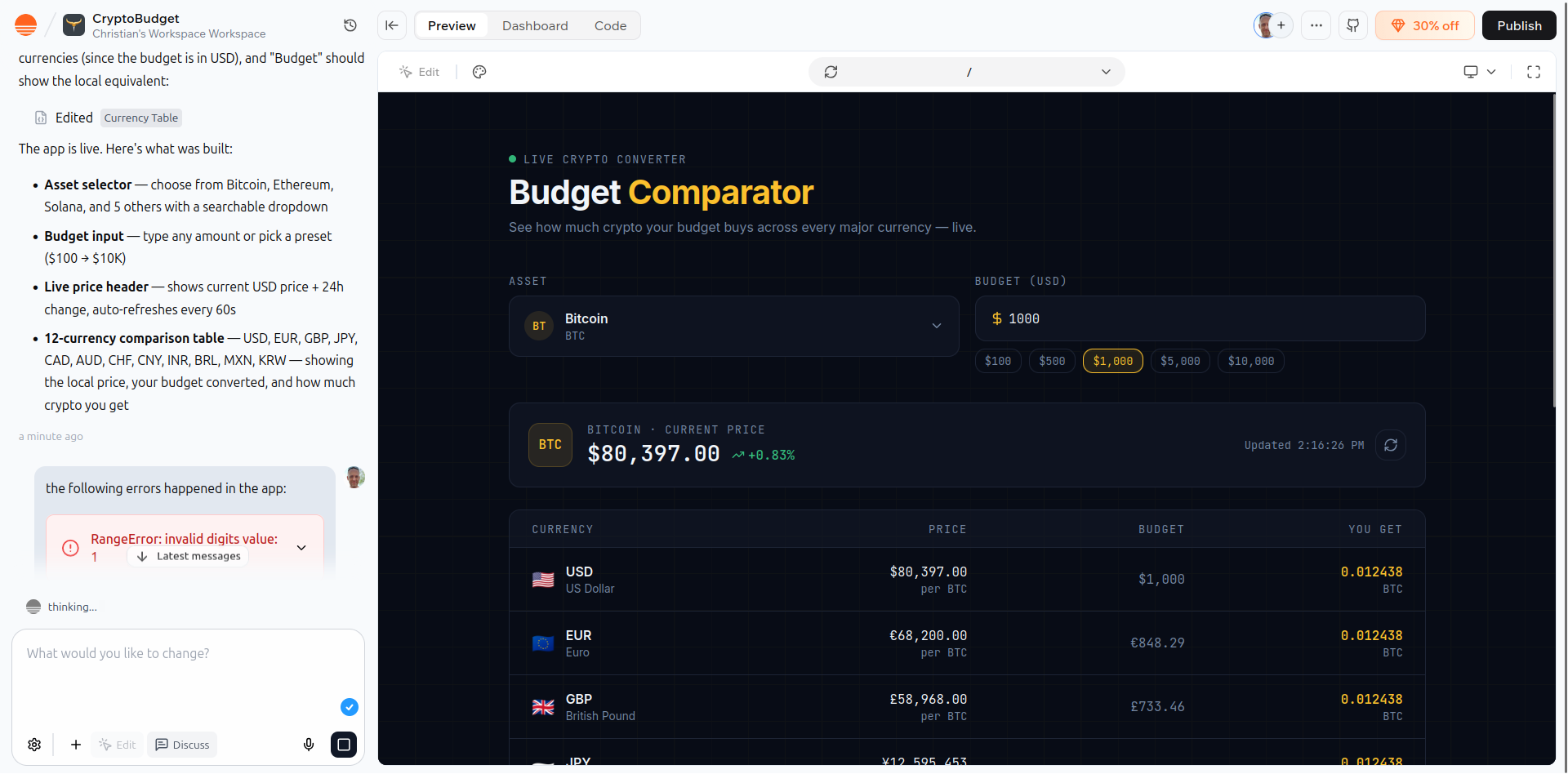
The prompt is as follows – and we’ve used the same prompt when testing other no-code tools:
Build a tool that compares the price of a specific asset (like Bitcoin) against multiple fiat currencies simultaneously.
Functional requirements
API Integration: Connect to a free API (like CoinGecko or ExchangeRate-API).
Input Handling: A field where the user enters a "Budget" (e.g., $1,000$).
Dynamic Calculation: A list or table that automatically updates to show how much of the asset that budget buys in USD, EUR, and GBP.
Toggle Switch: A "Dark Mode" or "Refresh" toggle to test UI state management.
--
Two initial attempts were made, each resulting in a drawn out “Building your idea” message – one of which lasted for 3 hours (in contrast, competing tools completed the task within 5 minutes).
Rather than re-entering the prompt for a third time, I posed the question: “why is this not working?” As a result, Base44 took a more verbal approach as it made its third attempt. While it made progress, it still wasn’t working, providing a “fix with AI” button to overcome problems displaying the app’s preview. This was progress, however, and within a few more moments the calculator was displayed.
The resulting web app delivered on the aims of the prompt, but offered an additional 9 currencies that were not specified. Publishing the app was a one-click process, and you can see the results here: https://global-crypto-spend.base44.app
Base44: Pricing and Documentation
The basic free version of Base44 is limited, but is enough to get you started. If you need more, the Starter plan is $20/month (working out at $16/month with annual billing) and gives you 100 message credits and 2000 integration credits.
The Builder plan takes things to the next level with 250 message credits and 10,000 integration credits each month, for just $50/month (or $40/month with annual billing), while the Pro plan has 500 message credits and 20,000 integration credits. This is $100/month, or $80/month with annual billing.
Finally, there is the $200/month option ($160/month if paying annually) with 1200 message credits and an incredible 50,000 integration credits each month. 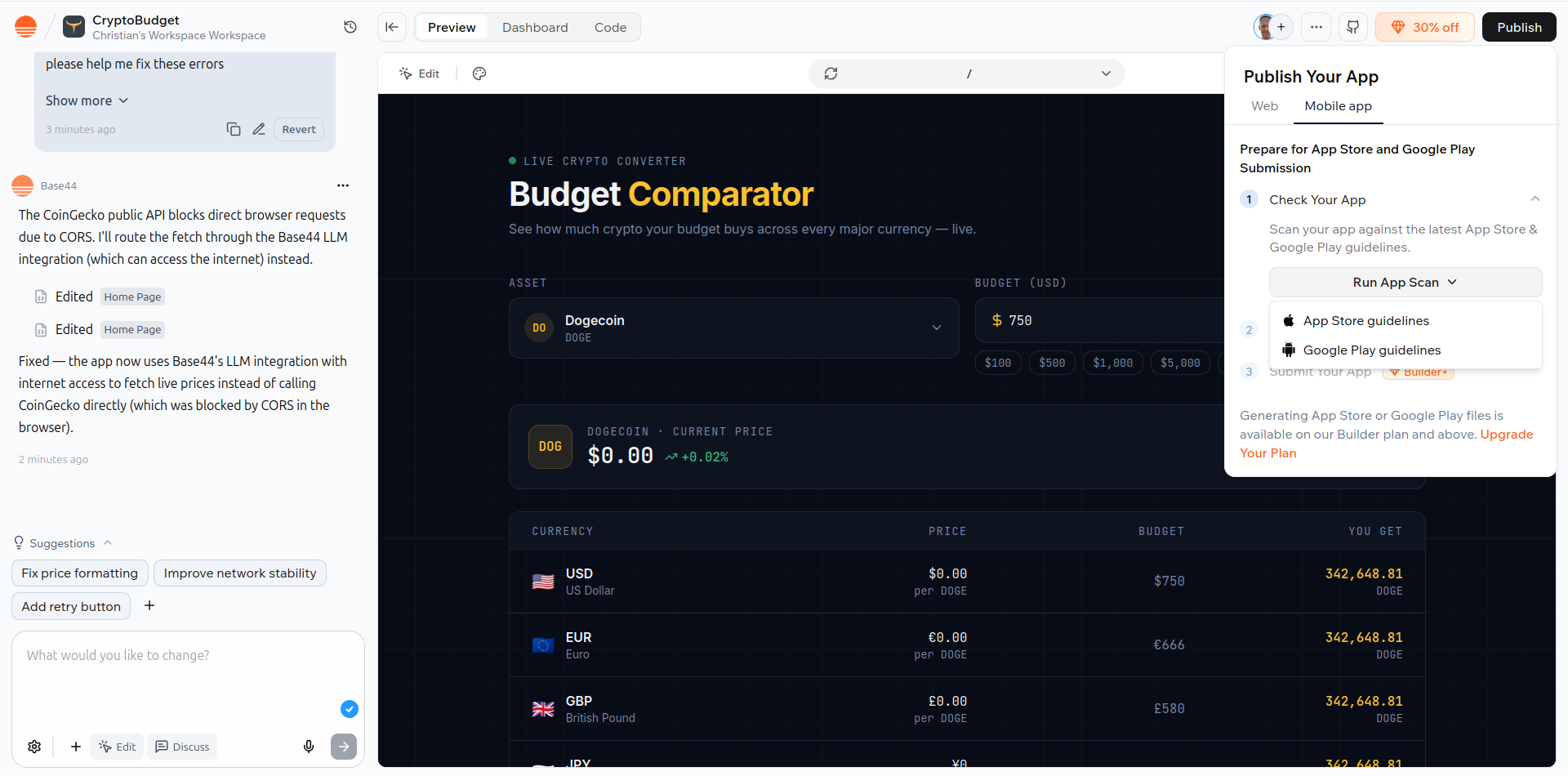
Where Base44 also excels is in its superb knowledge base. Available via docs.base44.com, this is a comprehensive collection of authored documents that guide you through everything from writing prompts to queries over connections. There is also support for billing.
If you can’t find the answers you’re looking for, the docs are supported by one of the best AI help chat assistants we’ve come across. It appears to be regularly maintained and trained on Base44’s current feature set, which is an advantage and preferable to receiving solutions that appear to be six months out of date.
Base44: The competition
Various alternatives to Base44 are available. Among these are Lovable, Bubble, and Hostinger Horizons. All offer free trials and a collection of affordable plans. However, Base44 seems to deliver a more compelling collection of support documents, and its dual focus on web apps and superagents as distinct project types is an advantage.
Most of these tools offer the same integrations and connections, so there isn’t a whole lot of difference in that regard. However, Hostinger Horizons and Lovable were – in our experience – faster at delivering a working web app based on the same prompt.
Base44: Final verdict
Base44 impresses alongside the competition, with a collection of plans and features that will certainly make choosing a no-code tool more difficult. Price-wise, the free option gives you everything you need to kick off no-code development, while the paid tiers evolve the available features as you spend more.
In terms of generating a project, while Base44 was responsive to fixing errors, it struggled to deliver what is a comparatively straightforward web app. Competing no-code solutions have performed more efficiently in this regard.
It also went off-script by delivering currencies that were not specified. With this in mind, you might wonder if the time spent working on and refining a prompt with Base44 might be time better spent with a more immediately responsive tool.
Base44 has an affordable set of plans and its mobile support is good, but more reliable alternatives are available.
Share
What's Your Reaction?
 Like
0
Like
0
 Dislike
0
Dislike
0
 Love
0
Love
0
 Funny
0
Funny
0
 Angry
0
Angry
0
 Sad
0
Sad
0
 Wow
0
Wow
0